
BotSpot · developer docs · using AI agents
Using an AI agent as an API
Any agent you have in MyCrew can be called from your own code with one plain HTTP request — no widget, no WhatsApp number, no browser. This page covers the first and simplest way in: an API key channel. Other ways to reach an agent — chat widget, share link, WhatsApp — have their own sections coming to this page.
- Page version
- 1.0
- Updated
- 27 Oct 2026
- Covers
- API key channel
Step by step
Create an API key channel
Every channel belongs to one agent. You create it from that agent's page in MyCrew — you do not need Workbench for this part.
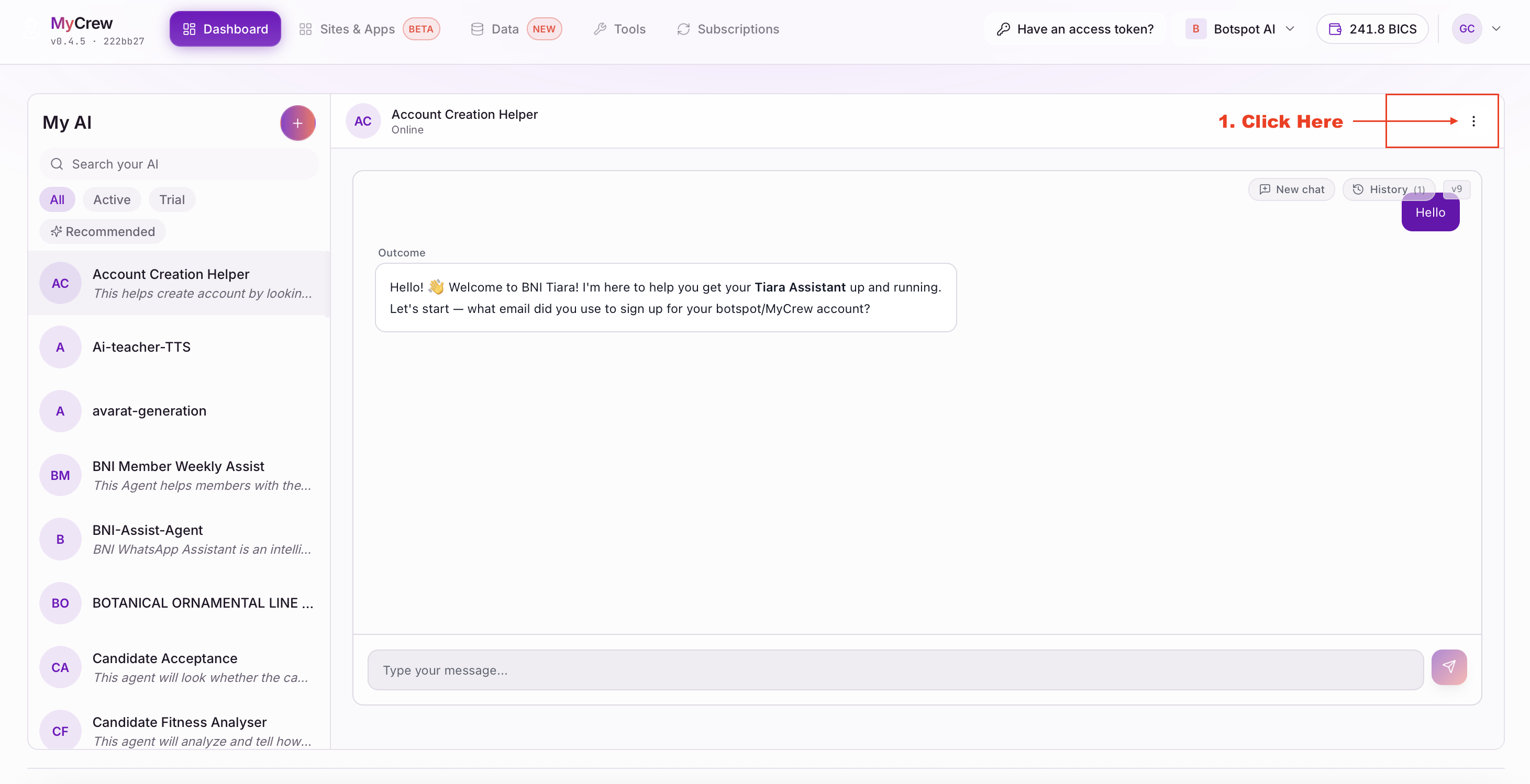
- 1Open the agent in MyCrew, then click the three-dot menu at the top right of its page.
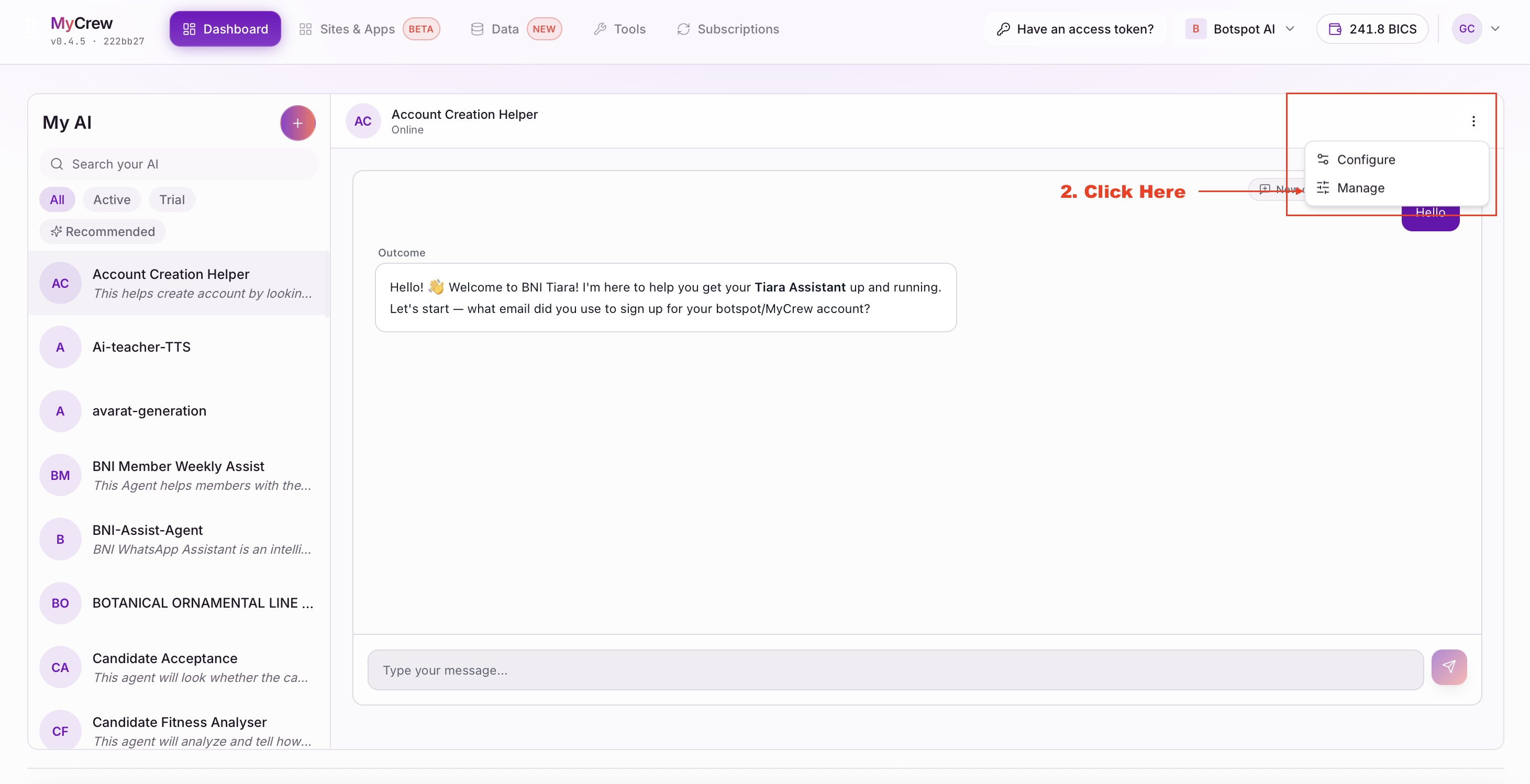
- 2Choose Manage from the menu.
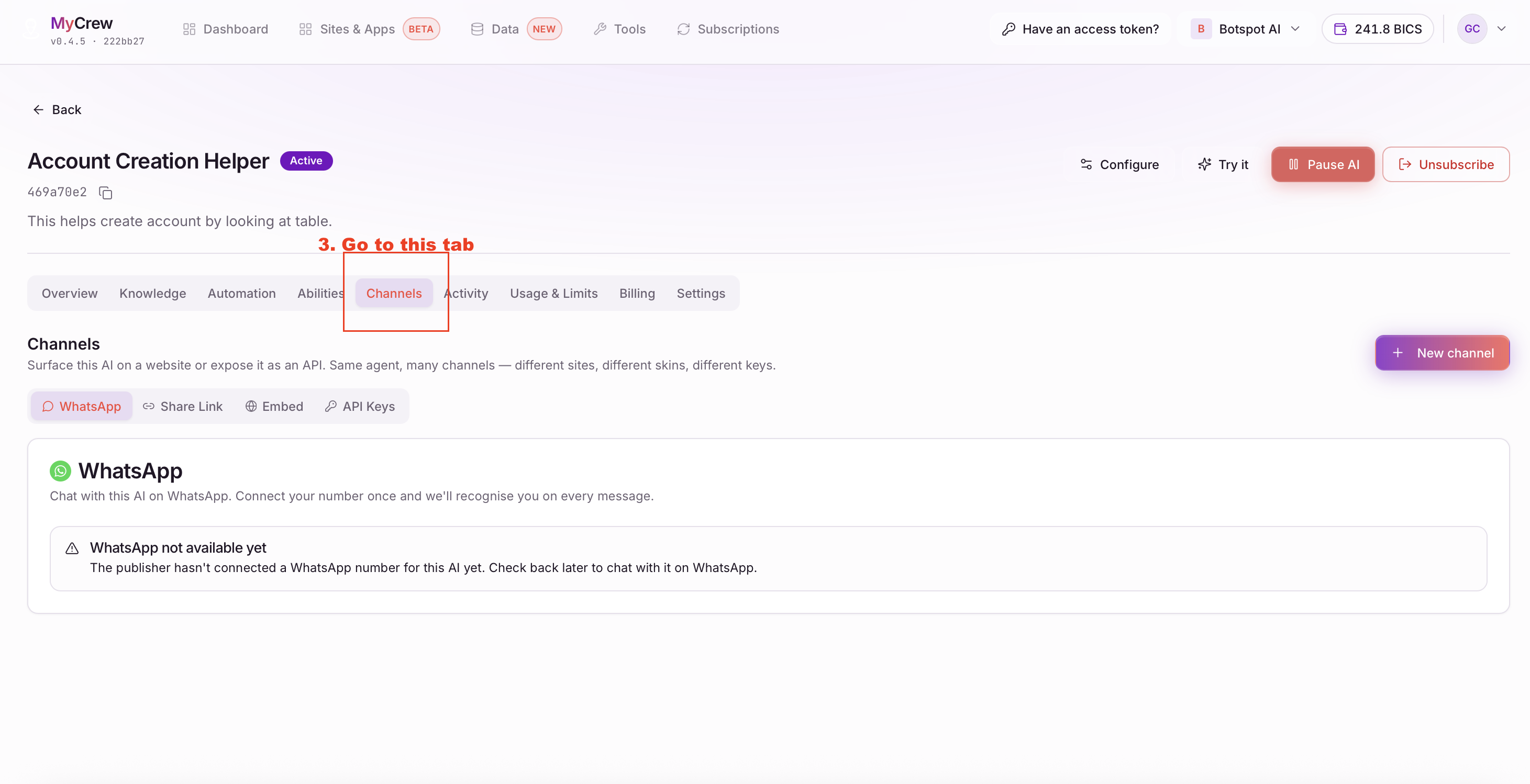
- 3On the agent's page, open the Channels tab.
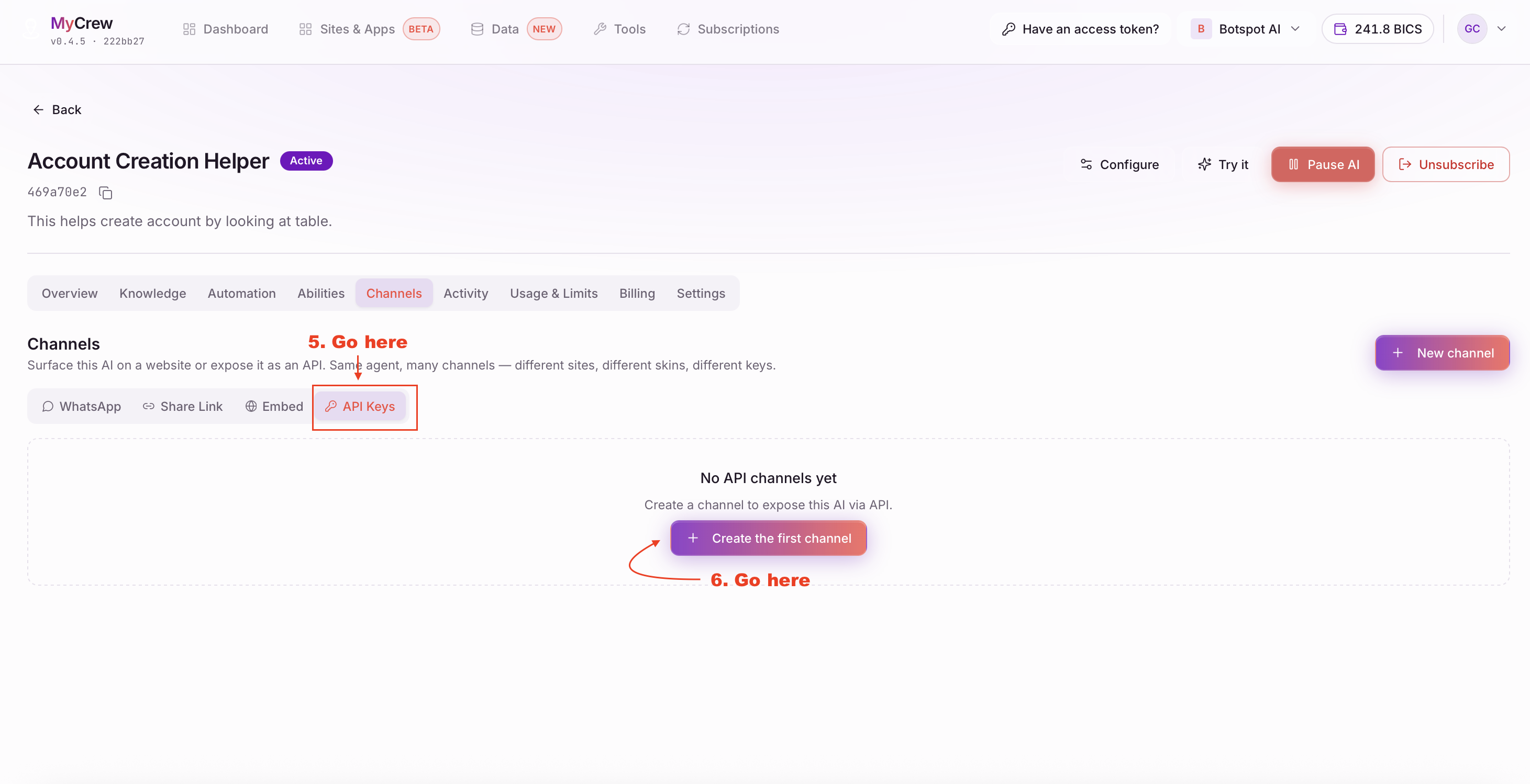
- 4Inside Channels, switch to the API Keys sub-tab.
- 5Click Create the first channel (or New channel at the top right).
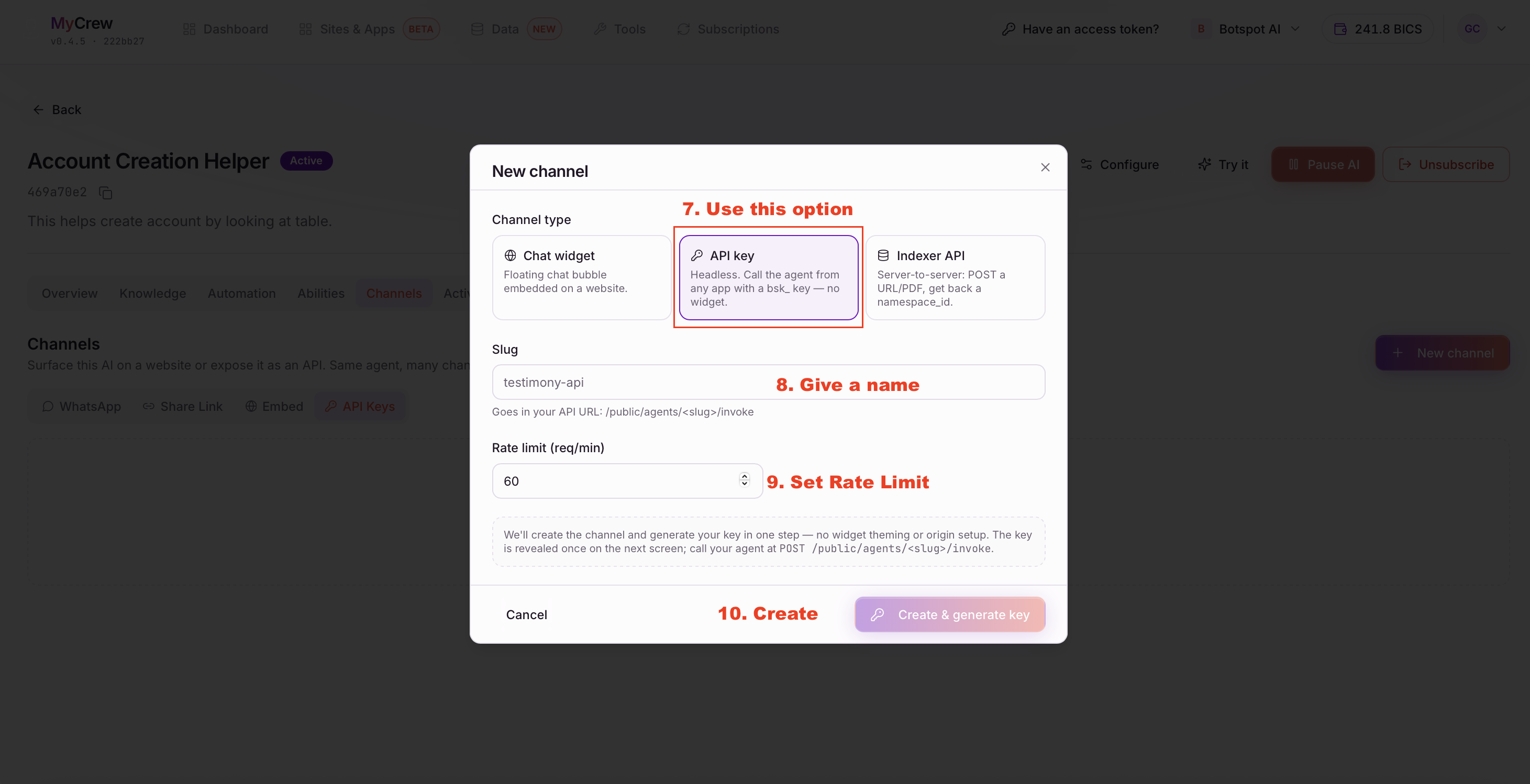
- 6In the dialog, pick API key as the channel type — not Chat widget or Indexer API.
- 7Give it a slug. This becomes part of the URL you call, so keep it short and URL-safe — no spaces.
- 8Set a rate limit in requests per minute. 60 is a reasonable default; you can change it later.
- 9Click Create & generate key.
The key is shown once, on the next screen, in the form bsk_…. Copy it into your secrets store immediately — MyCrew cannot show it to you again. If you lose it, rotate the channel to mint a new one; the old key stops working the moment you do.
The request
Call your agent
Send a POST request to the agent's invoke endpoint, with your key in the X-Botspot-Key header — not Authorization: Bearer.
curl -X POST "https://api.botspot.app/agent/v1/public/agents/<slug>/invoke" \
  -H "Content-Type: application/json" \
  -H "X-Botspot-Key: bsk_xxxxxxxxxxxxxxxxxxxxxxxxxxxxxxxx" \
  -d '{
    "messages": [
      { "role": "user", "content": "Hello" }
    ],
    "session_id": "optional-conversation-id"
  }'
Swap <slug> for the slug you chose when creating the channel, and the key for your own. The response is plain JSON:
{
  "reply": "Hi! How can I help?",
  "session_id": "optional-conversation-id"
}
messages is the whole visible thread, not just the latest line — resend every earlier turn on each call, the same way the OpenAI chat format works. The agent reads the last user turn as the one it is answering.
session_id is optional and up to you to generate (a UUID is fine). Send the same one on every call in a conversation if your agent uses memory — without it, memory nodes quietly do nothing and every call behaves like a fresh, single-shot question. The response echoes it back unchanged.
Who pays
Billing and limits
Calls are billed in BICS from the channel owner's wallet — the person or organisation that created the channel in MyCrew — never from the caller of your API. There is no sign-in on this endpoint and nothing to bill a caller to, so keep your key private the same way you would a payment credential: anyone holding it can run your agent on your account's balance.
The rate limit you set when creating the channel caps how hard your own integration can hit the endpoint. If you expect to send more than the limit you chose, raise it on the channel rather than retrying aggressively against a low one.
Reference
If a call does not go through
The response body always has a readable reason. The common ones:
| Status | You see | What it means | What to do |
|---|---|---|---|
| 401 | Provide X-Botspot-Key or call from an allowed origin. | No key was sent on the request at all. | Add the X-Botspot-Key header to every call. |
| 401 | Malformed API key. | The value sent is not shaped like a bsk_ key. | Check you copied the whole key, with the bsk_ prefix, and no surrounding quotes or whitespace. |
| 401 | Invalid API key. | The key is well-formed but does not match any channel — wrong key, or it was rotated. | Open the channel in MyCrew and re-copy the current key, or rotate it and update your integration. |
| 400 | messages must contain at least one user turn. | The messages array was empty, or had no role: "user" entry. | Send at least one { "role": "user", "content": "..." } turn. |
| 402 | insufficient_bics | The wallet that pays for this channel does not have enough BICS to run the agent. | Add BICS to the channel owner’s wallet in MyCrew, Settings, Plan, then retry. |
| 404 | Not found | The slug in the URL does not match any channel, or the channel was deleted. | Check the slug against the channel’s API Keys tab — it is the exact path segment, not the channel’s display name. |
| 502 | Workflow run failed. | The key and request were fine, but the agent itself hit an error while running. | Open the agent in Workbench and run the same input in Test Run to see which step failed. |
Troubleshooting
Common questions
Can I stream the reply instead of waiting for the full response?
Yes — send an Accept: text/event-stream header (or add ?stream=1) to get the reply as it is generated. Leave it off for a single JSON response, which is what most server-to-server integrations want.
Does the response tell me how many BICS the call cost?
Not directly — settlement happens after the response is sent. Check the channel owner's wallet history in MyCrew, Settings, Plan for the exact cost of each run.
My agent isn't using what we discussed earlier in the conversation.
Make sure you are sending the same session_id on every call, and that you are resending the full messages array each time, not just the newest line.
Can I call this from a browser?
An API key channel is meant for server-to-server calls, where your key never reaches a browser. If you need an agent embedded in a web page, use a Chat widget channel instead — it is built for that and does not expose a key to visitors.